SeatMaps API for Developers
Fetch seat maps, render them beautifully, and assign seats reliably — with REST, iframe embed, or a React renderer.
- JSON-first API
- Works with embed + React
- Built for production flows
Features
Everything you need to integrate seat maps end-to-end.
Seat characteristics
Expose seat attributes like exit row, bulkhead, power, extra legroom, recline limits.
Assignment workflow
Assign, reassign, and validate seat selections reliably.
Customization
Control seat rules, availability logic, and UI behavior to match your product.
Themes
Apply airline or brand styling with consistent highlighting and visual hierarchy.
RTL & localization
Right-to-left layouts and i18n for labels, tooltips, and metadata.
Built for global, customizable products
- Theming & branding hooks
- RTL/LTR layout support
- Localization (labels, tooltips, metadata)
- Custom seat states & rules
- Responsive by default
How it works
From API key to seat assignment — in minutes.
- Get an API key
Create a project and generate credentials.
- Request seat map
Call the SeatMaps endpoint for a segment/aircraft.
- Render UI
Use iframe or React renderer to display seats.
- Assign seats
Submit seat selections back to your system.
curl -X POST https://api.seatmaps.com/v1/seatmaps \
  -H "Authorization: Bearer <API_KEY>" \
  -H "Content-Type: application/json" \
-d '{"flightNumber":"LH123","date":"2026-02-10","from":"MUC","to":"CDG"}'Integrations
Choose the integration style that fits your product.
API (Quicket / Jets)
Core integration layer.
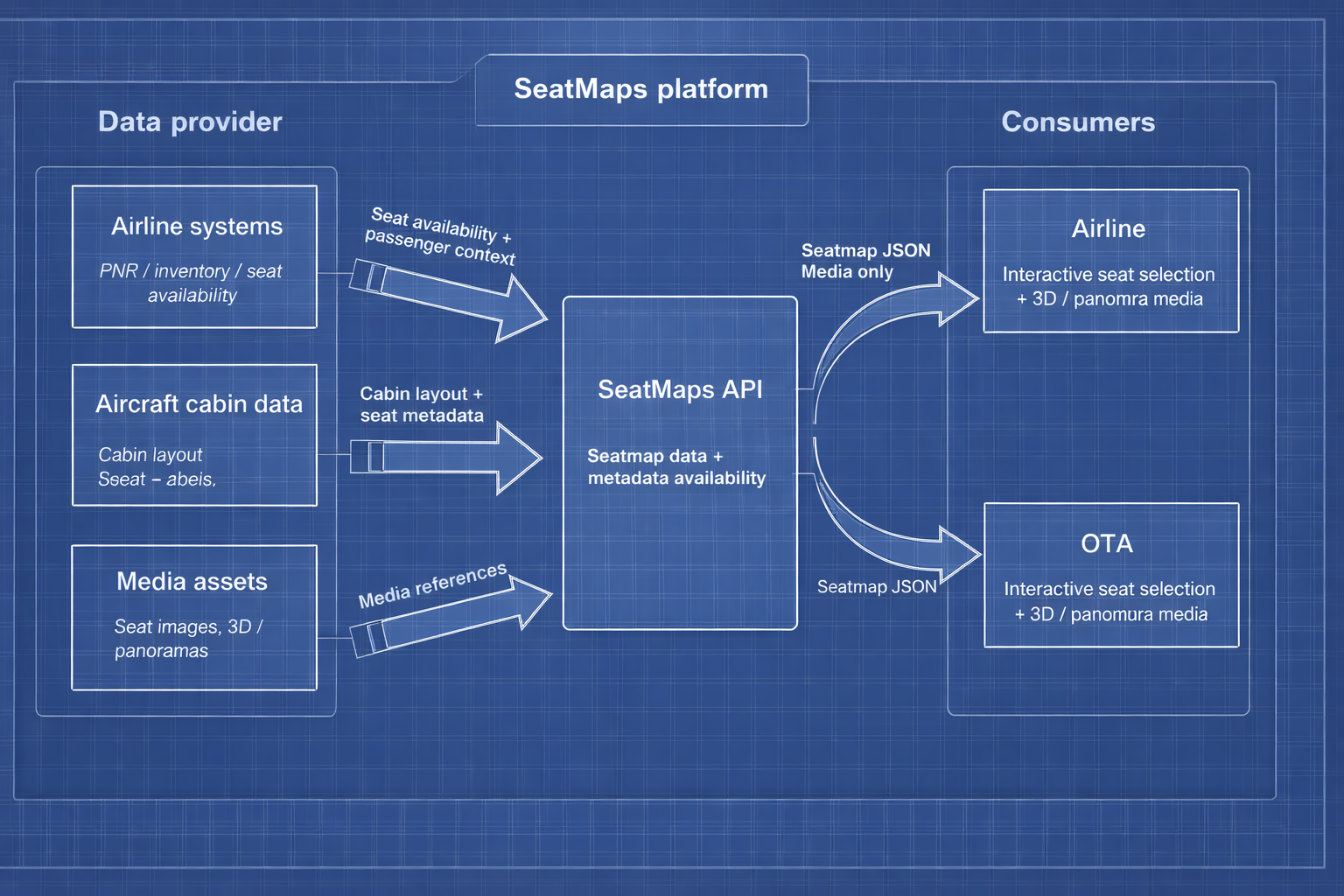
Your backend requests the seat map by flight + cabin parameters.
You optionally pass Availability and Passengers asynchronously.
The API returns layout metadata and (optionally) media for the aircraft cabin.
Best for: teams that already own the booking / PNR layer and want full control over data and orchestration.
API docs →React library (JetsSeatMap)
Drop-in React component for rendering a full seat map UI.
You provide Flight (required) and optionally Availability and Passengers.
You subscribe to events like onSeatSelected, onSeatUnselected, and onTooltipRequested.
You can switch decks externally via currentDeckIndex and react to layout updates.
Best for: React web apps that want a production-ready renderer with a clean parent ↔ seatmap contract.
React lib →iframe embed (requires API)
Fastest UI rollout option.
Embed the seat map UI into any web app with minimal frontend integration.
Your backend still calls the API and provides passenger and segment context.
The parent layer can keep a light contract: init parameters in, events out.
Best for: MVPs, pilots, and teams that need quick time-to-value without deep UI ownership.
iframe guide →Wrappers (Angular / Vue / Web)
Use SeatMaps in non-React stacks.
Wrap the React renderer or use iframe, depending on your architecture.
Keep the same Flight / Availability / Passengers concepts and API contracts.
Integrate via framework bindings and a small parent communication layer.
Best for: Angular/Vue/legacy web apps that want SeatMaps without rewriting the whole frontend.
Wrappers →React Native
Mobile-ready integration path for native apps.
Reuse the same API and the same seat map concepts as on the web.
Adapt UI integration to platform navigation and screen constraints.
Keep passenger management and validation in the parent layer if needed.
Best for: iOS/Android apps that need a consistent seat map experience with shared data contracts.
React Native →Integration options compared
Choose the best integration style for your product — fastest embed, maximum UI control, or pure API.
| REST API | iframe embed | React renderer | |
|---|---|---|---|
| Time to integrate | ★★☆☆☆ "Custom wiring" | ★★★★★ "Fastest" | ★★★☆☆ "Moderate" |
| UI control | ★★★★☆ "Your UI" | ★★☆☆☆ "Limited" | ★★★★★ "Full" |
| Custom styling | ★★★★☆ "Any" | ★★☆☆☆ "Basic" | ★★★★★ "Full" |
| Backend required | Yes | No | Yes |
| Best for |
Custom flows
complex booking logic and back-office tools |
MVP / pilots
fastest time-to-value with minimal code |
Product teams
custom UI/UX inside your app |
Use cases
Built for real booking and operations workflows.
Booking checkout
Seat selection inside your purchase flow — fare-aware rules, paid seats, and availability in real time.
Corporate travel
Policy constraints, approvals, and seat preferences — consistent UX across managed programs.
Call center & servicing
Agents can quickly re-seat passengers, handle disruptions, and validate rules without guesswork.
Group bookings
Seat families together, handle partial availability, and apply constraints for large PNRs.
Mobile & kiosk
Lightweight flows with predictable performance — ideal for check-in, self-service, and mobile apps.
Code examples
Minimal, production-oriented examples for the most common integration scenarios.
React — minimal integrationRequired
Required setup to render a seat map using the React renderer.
import { JetsSeatMap } from "jets-seatmap-react-lib";
const flight = {
id: "LH123-2026-02-10",
airlineCode: "LH",
flightNo: "123",
departureDate: "2026-02-10",
departure: "MUC",
arrival: "CDG",
cabinClass: "E"
};
const config = {
width: 420,
lang: "EN",
units: "metric",
apiUrl: "PROVIDED_API_URL",
apiAppId: "PROVIDED_APP_ID",
apiKey: "PROVIDED_API_KEY"
};
export default function Page() {
return (
React — passengers & seat selectionCommon
Pass passengers to enable seat selection.
Use events to sync selections to your parent flow.
const passengers = [
  { id: "1" },
  { id: "2", passengerType: "CHD", passengerLabel: "John" }
];

function onSeatSelected(updatedPassengers) {
  console.log("Selected:", updatedPassengers);
}

function onSeatUnselected(updatedPassengers) {
  console.log("Unselected:", updatedPassengers);
}
Availability — pricing & rulesOptional
Control which seats are available, their pricing, and feature badges.
Use label "*" as a wildcard fallback for all seats.
const availability = [
  {
    label: "*",
    currency: "USD",
    price: 30,
    color: "lightgrey",
    additionalProps: [
      { label: "Wi-Fi", icon: "wifi" },
      { label: "Power", icon: "power" }
    ]
  },
  {
    label: "12F",
    currency: "USD",
    price: 55,
    color: "green",
    additionalProps: [
      { label: "Extra legroom", icon: "dot" }
    ]
  }
];
Custom tooltip — handle seat click/hoverAdvanced
Disable built-in tooltip and render your own overlay UI.
Useful for fully branded UX or external passenger management.
const configCustomTooltip = {
  ...config,
  builtInTooltip: false,
  tooltipOnHover: true
};

function onTooltipRequested({ seat, element, event }) {
  // seat.label, seat.features, seat.measurements, seat.priceValue, etc.
  console.log("Tooltip requested for seat:", seat.label);
  // Tip: element.getBoundingClientRect() helps position a custom tooltip.
}
REST API — curl request (seat map)Backend
Direct API request for seat map data (backend-first integration).
Use this when you build your own UI or drive iframe/React with server context.
curl -X POST https://api.seatmaps.com/v1/seatmaps \
  -H "Authorization: Bearer " \
  -H "Content-Type: application/json" \
  -d '{
    "airlineCode": "LH",
    "flightNo": "123",
    "departureDate": "2026-02-10",
    "departure": "MUC",
    "arrival": "CDG",
    "cabinClass": "E"
  }'
Media integration (photos & panoramas)
How to correctly integrate seat photos and panoramas using SeatMaps media metadata.
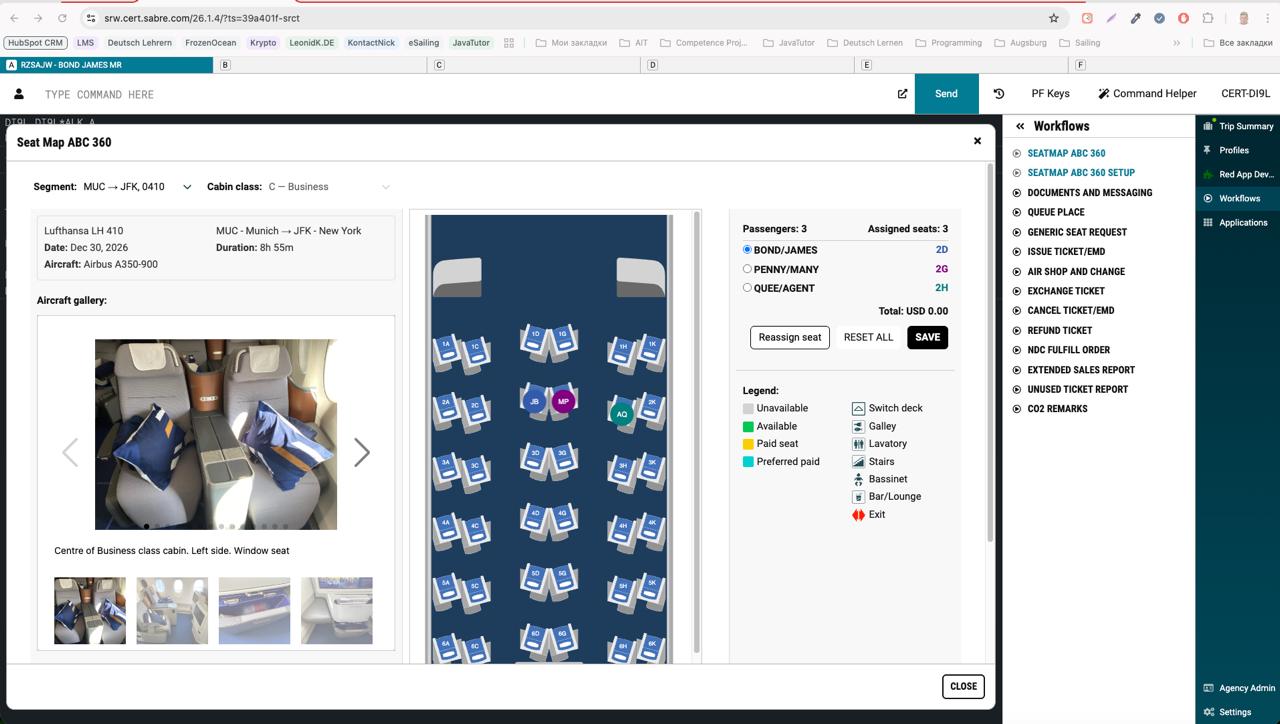
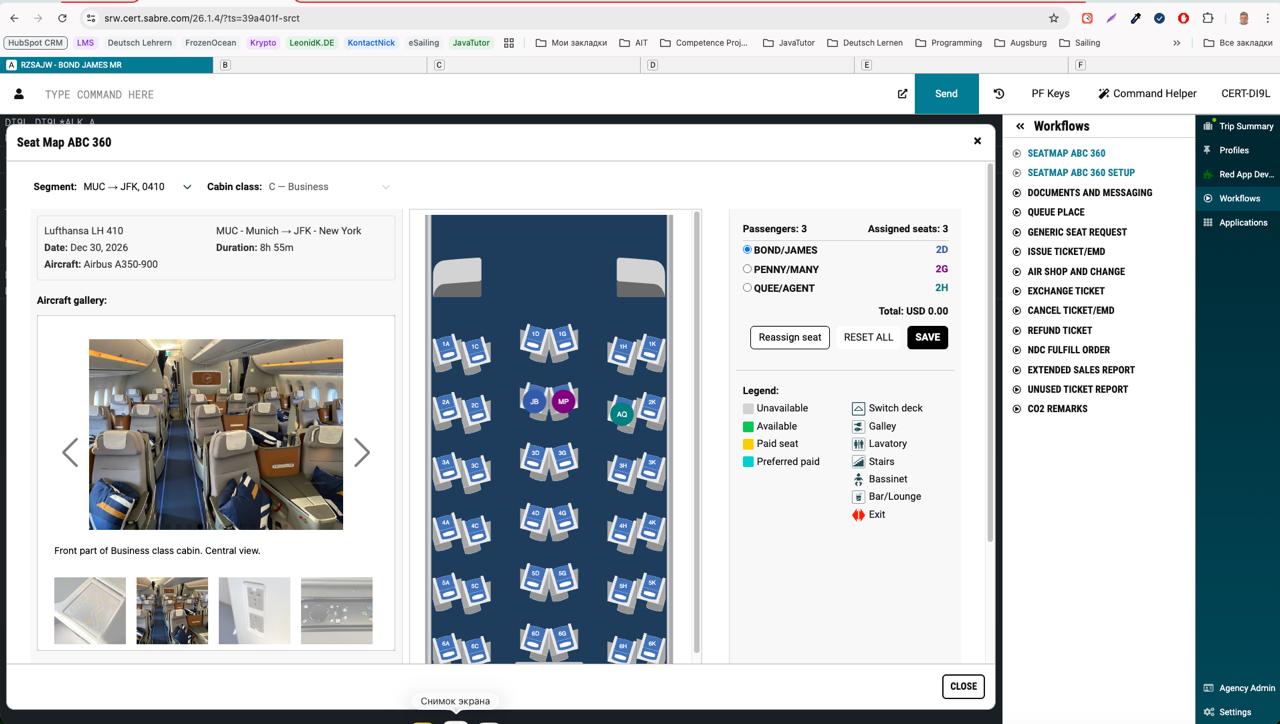
SeatMaps can provide media assets (seat photos and 360° panoramas) together with the seat map layout. These assets are returned as part of the seat map initialization payload and are intended to be rendered by the parent application (web, iframe, or Red App layer).
Media availability
Media data is returned inside the onSeatMapInited event. If media is available for the given aircraft and cabin,
it will be exposed via the media object.
onSeatMapInited = (data) => {
  const media = data.media;

  // media.photoData   → seat / cabin photos
  // media.panoData    → 360° panoramas

  console.log(media);
};
Media data structure
Photos and panoramas are returned as arrays with URLs and metadata.
interface IMediaData {
  photoData: IPhotoData[];
  panoData: IPanoData[];
}

interface IPhotoData {
  file: string;
  thumb: string;
  size: { w: number; h: number };
  description: string;
}

interface IPanoData {
  file: string;
  rawFile: string;
  thumb: string;
  description: string;
}
Rendering media in the parent layer
SeatMaps does not render media automatically. The parent layer is responsible for displaying photos or panoramas (for example, in a modal or side panel).
- Wait for the seat map to be initialized
- Read media metadata from onSeatMapInited
- Render media inside your own UI (modal, drawer, iframe overlay)
- Control visibility and lifecycle from the parent layer
Example: render photos in a modal
function onSeatMapInited(data) {
  const photos = data.media?.photoData || [];

  if (!photos.length) return;

  openMediaModal({
    images: photos.map(p => ({
      src: p.file,
      thumb: p.thumb,
      description: p.description
    }))
  });
}
Example screenshots (Sabre / Red App)
Below are real screenshots from a Sabre Red App integration. Click any image to open it in full size.
Example: rendering panoramas via iframe
function openPanorama(pano) {
  const iframe = document.createElement("iframe");

  iframe.src = pano.file;
  iframe.width = "100%";
  iframe.height = "100%";
  iframe.allowFullscreen = true;

  document.getElementById("pano-container").appendChild(iframe);
}
Common integration pitfalls
- Media appears briefly and disappears — usually caused by re-rendering or unmounting the container component.
- Media tied to seatmap lifecycle — media UI should live outside the seatmap component.
- Missing media — not all aircraft or cabins have media available.
- CSP / iframe restrictions — especially relevant in Red App or embedded environments.
Red App (Sabre) integration notes
In Red App environments, media iframes must comply with Sabre CSP and iframe policies.
Recommendation: Treat media as a sibling UI layer to the seat map, not a child of it.
Docs & resources
Start here — everything you need to ship.
FAQ
Quick answers to common integration questions.
Do you support multiple aircraft layouts?
Yes — seat maps are returned per segment/aircraft configuration when available.
Can I customize the UI?
Use the React renderer for full control, or iframe for quickest embed.
How do you represent seat characteristics?
Seat objects include characteristics flags/metadata so you can highlight bulkhead, exit rows, etc.
Is this suitable for production?
Design focuses on stable schemas, caching patterns, and predictable behavior.
Ready to build with SeatMaps?
Integrate seat maps in minutes — scale to production.